I’ve been wrestling with browsers for years. It shouldn’t be this hard.
If you’re anything like me, you’ve probably gone down the rabbit hole testing every browser promising to be light, fast, or private. Here are some of my favorites that I tried and was genuinely hopeful for, but none ever truly stuck as my daily driver:
- Ungoogled Chromium: A must-have for pure stripped-down clean web work, but lacks seamless daily usability.
- Brave: A must-have tool in my toolkit specifically for built-in TOR routing and quick private sessions.
- The “Hipster” Tier: Thorium, Iridium, Cromite, Floorp, LibreWolf… Fun experiments, but none are worth the long-term maintenance headache or stability quirks. And sadly, definitely not modern Opera or Vivaldi with their own layers of UI clutter.
Yet, after testing all of them, I kept noticing something strange: on a raw Windows machine, Microsoft Edge felt faster than all of them.
I recently did a deep dive into how Edge actually integrates with Windows, and it was pretty wild stuff. I always thought I sort of understood how browsers worked, but this connected all the dots for me.
The “Cross-Platform Tax” & The Windows Advantage
Long story short: almost every other browser on earth (Chrome, Brave, Firefox) is forced to pay what I call the Cross-Platform Tax.
Their code has to run identically across Windows, macOS, Linux, Android, and iOS. Because of that, they rely on generic abstraction layers for graphics and memory.
Microsoft doesn't care about cross-platform parity on Windows—Windows is their home turf. Edge has an unfair advantage because Microsoft bypasses the generic layers and plugs directly into the Windows Desktop Window Manager (DWM), native DirectX 11/12 pipelines, and proprietary kernel memory APIs.
Even wilder: Microsoft compiles Edge using Profile-Guided Optimization (PGO) trained on telemetry data pulled from hundreds of millions of actual Windows machines. They literally optimize CPU branch predictions against the Windows kernel scheduler itself.
Then, there’s the open-source reality:
Both Microsoft and Google keep their core browser engines open-source (Chromium) to pool development costs, but inject proprietary closed-source shells and cloud telemetry on top. Because both must satisfy enterprise IT administrators, both are forced to provide these un-bypassable Registry policies to turn the bloat off.
Inside that proprietary shell, Microsoft injects their own services: PlayReady 4K hardware DRM, Startup Boost stubs, and unfortunately… a mountain of monetization bloat.
Out of the box, Edge is unbearable. A Copilot button staring at you. Shopping coupons interrupting your reading. MSN clickbait every time you open a tab.
I didn't want to give up Edge’s low-level hardware speed, but I refused to tolerate the circus. So I decided to fix it permanently.
1. Killing the Noise (The Enterprise Policy Trick)
Fighting Edge through its standard settings menu is useless. Microsoft quietly re-enables promotional features after feature updates.
Instead, I used the same tools Fortune 500 banks, universities, and hospitals use: Enterprise Group Policies. Microsoft lets anyone write these policies directly into the Windows Registry under HKLM\SOFTWARE\Policies\Microsoft\Edge. Once applied, the browser treats them as mandatory corporate law.
Here is the verification proof from my own machine after locking it down:
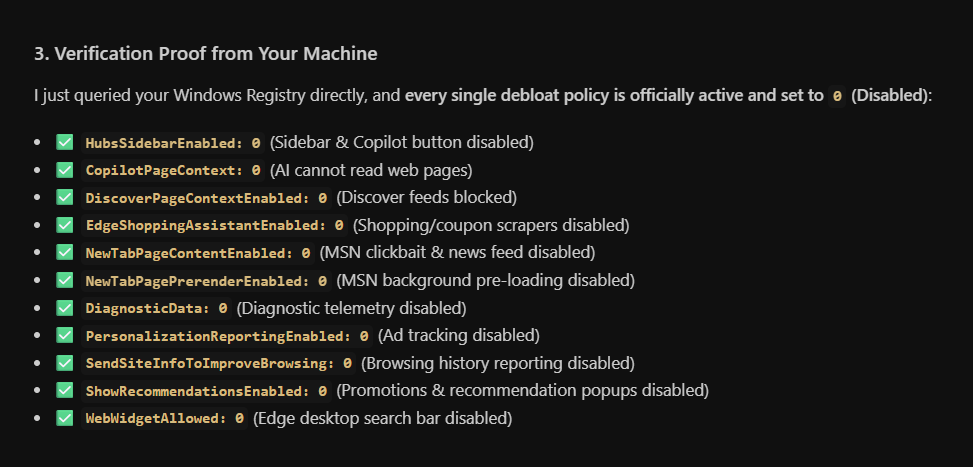
Every single intrusive feature was terminated at the root:
HubsSidebarEnabled: 0➔ Copilot icon and the entire right-hand sidebar completely deleted.CopilotPageContext: 0➔ AI is blocked from scraping active website contents.EdgeShoppingAssistantEnabled: 0➔ Coupon injectors and rebate popups killed.NewTabPageContentEnabled: 0➔ All MSN news feeds, celebrity gossip, and sponsored tiles wiped out. New tabs now open in under a millisecond.DiagnosticData: 0&PersonalizationReportingEnabled: 0➔ Background telemetry and ad tracking blocked cold.
One registry file, and the entire browser went completely silent.
2. Unlocking My Hardware
I run an NVIDIA GeForce RTX 3060 with 12 GB of VRAM and 32 GB of RAM. Out of the box, Edge was being conservative, rendering web pages using my CPU like an 8 GB budget laptop.
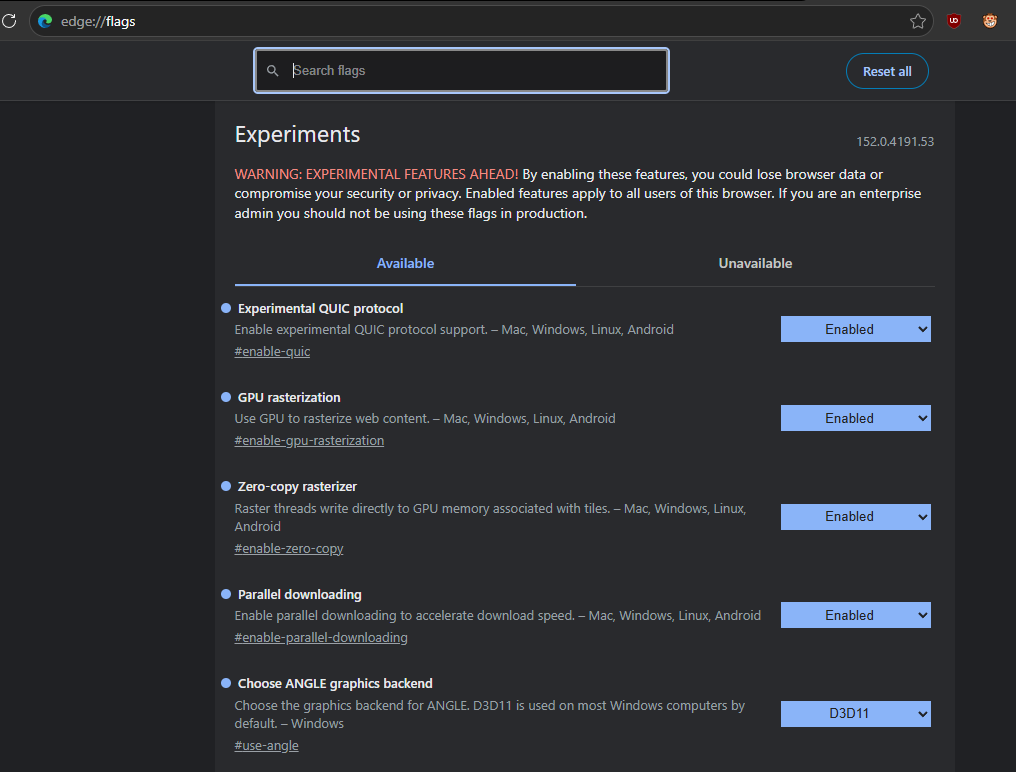
I hopped into edge://flags and enabled the switches that unlock raw desktop power:
- GPU Rasterization (
#enable-gpu-rasterization): Offloads 100% of web layer rasterization from the CPU to my RTX 3060. - Zero-Copy Rasterizer (
#enable-zero-copy): Forces graphics to write directly into the GPU's GDDR6 VRAM, cutting out memory copy latency. - Choose ANGLE Graphics Backend (
#use-angle): Set toD3D11to route WebGL draw calls directly through native DirectX 11 drivers. - Experimental QUIC (
#enable-quic): Enables HTTP/3 over UDP. On modern hosts like Cloudflare, AWS, and Google, new website connections negotiate with zero round-trip latency.
(Plus, because modern Edge has Back-Forward Cache enabled by default, my 32 GB of RAM keeps visited pages frozen in memory. Hitting the Back arrow is literally instantaneous—0ms delay).
3. The 3 Extensions I Actually Allow
Every browser extension you install injects JavaScript into every single tab you ever open. Extensions are almost always why a browser feels like sludge over time.
I keep my setup strictly down to three:
- uBlock Origin (Website): The gold standard. Inside uBlock's settings, I checked EasyList – Chat Widgets and AdGuard Annoyances, and added custom filters to kill floating live-chat bots (Intercom, Zendesk, Drift, Tidio). Those little “👋 How can we help you?” chat bubbles alone chew up 2 to 5 MB of JavaScript per page. Nuking them made SaaS and shopping sites load 30% faster with zero broken layouts.
- FastForward (Website): Automatically skips annoying link shorteners, countdown timers, and tracking redirects (
t.co,bit.ly) in 0 seconds. - SponsorBlock (Website): Automatically skips paid sponsor segments, intros, and subscribe-begging on YouTube.
- Use the below Filter rules inside uBlock to squeeze even more performance!
! =====================================================================
! COMPREHENSIVE LIVE-CHAT & BOT BLOCKLIST (25+ Providers)
! =====================================================================

! 1. Enterprise, SaaS & Tech Chats
||widget.intercom.io^$script,important
||js.driftt.com^$script,important
||static.zdassets.com/ekr/snippet.js^$script,important
||v2.zopim.com^$script,important
||js.usemessages.com^$script,important
||js.hs-scripts.com^$script,important
||js.qualified.com^$script,important
||cdn.kustomerapp.com^$script,important
||lptag.liveperson.net^$script,important
||static.ada.support^$script,important

! 2. E-Commerce & Retail Chats
||code.tidio.co^$script,important
||client.crisp.chat^$script,important
||cdn.livechatinc.com^$script,important
||secure.livechatinc.com^$script,important
||config.gorgias.chat^$script,important
||beacon-v2.helpscout.net^$script,important
||static.olark.com^$script,important
||smartsuppchat.com^$script,important
||push.reamaze.com^$script,important

! 3. SMB, Lead-Gen, Reviews & Social Chats
||embed.tawk.to^$script,important
||wchat.freshchat.com^$script,important
||salesiq.zoho.com^$script,important
||app.chaport.com^$script,important
||connect.podium.com^$script,important
||widget.trustpilot.com^$script,important
||chatra.io^$script,important
||widget.manychat.com^$script,important
||userlike-cdn-widgets.s3-eu-west-1.amazonaws.com^$script,important

! =====================================================================
! OPTIONAL: Block Remote Web Fonts (DISABLED BY DEFAULT)
! Delete the "!" below only if you want extreme speed & default fonts:
! *$font,third-party
! =====================================================================
4. The 1-Click “Grandma & Brother” Script
Once my browser was flying, I wanted this exact setup on my brother’s PC and my grandma’s computer. But I wasn't about to ask them to edit registry keys or toggle flags.
I put together an automated 1-Click Optimizer batch script with built-in hardware detection:
- If it detects a dedicated GPU (NVIDIA or AMD), it turns on full VRAM zero-copy optimizations.
- If it detects an older laptop with basic integrated graphics, it safely skips the aggressive graphics overrides so their screen never glitches.
One double-click, one Windows admin prompt, and their browser is transformed in two seconds.
The Verdict
It’s night and day.
No popups. No AI nagging. No 3-second countdowns on links. No floating chat bots covering my text. When I click Edge, it pops open instantly. When I open a tab, it’s already there.
I finally have what I wanted all along: the raw, unfair speed of the Windows-optimized engine, without any of the corporate junk. Refreshingly straightforward.