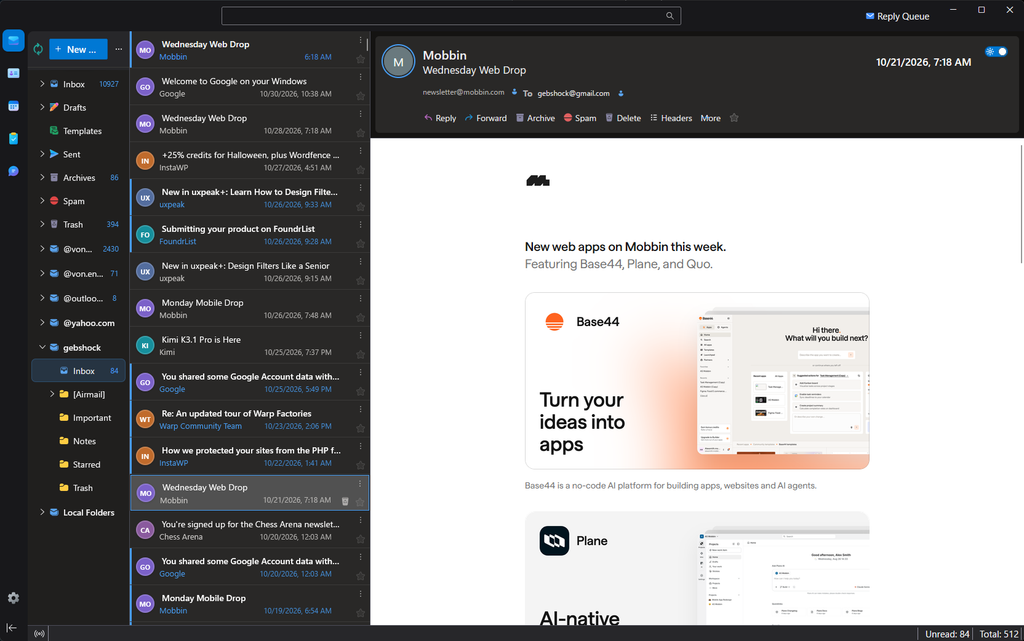
I wanted a desktop email app that's still getting updates, without giving up the clean look of Outlook.com. Betterbird, an improved version of Thunderbird, does the job. With a great open-source theme and a few tweaks of mine, it looks a lot better too.
Here's how to set up the same look on Windows.
Credit where it's due
The hard work here isn't mine. This look is built on FluentBird Polished by Browmew, which was the inspiration for all of this. It includes sender initials, message cards, and an account switcher. It builds on the original FluentBird theme.
If you like the result, go give those projects a star on GitHub.
My download is small, because it only holds my tweaks. You'll get Betterbird and FluentBird Polished directly from their own pages.
What my tweaks change
- Outlook-style colors and fonts
- Subject on top in the message list, with the sender below
- A compact reading pane header with a separate subject bar
- A slim privacy notice that can sit above the email or at the bottom
- Flat toolbar buttons and a restyled compose window
- Faster hover response
Step 1: Get Betterbird
Go to the Betterbird downloads page and download Windows Portable in your language. Extract it to a folder that's easy to find, like C:\Apps\Betterbird.
Portable means it keeps everything in that one folder and leaves any email app you already use alone. It's also very easy to update and backup.
Step 2: Add your email
Open BetterbirdLauncher.exe and sign in to your email account. Then fully close Betterbird.
Your email stays on your provider's server. But anything you delete or move in Betterbird also changes in your other email apps, because they all use the same mailbox.
Step 3: Get my tweaks
https://maggew.com/wp-content/uploads/2026/11/outlook-tweaks-for-betterbird.zip
Extract the zip. Move the Outlook-Tweaks-for-Betterbird folder into your Betterbird folder, so it sits next to BetterbirdLauncher.exe.
Step 4: Get FluentBird Polished
Go to the FluentBird Polished releases page and download FluentBird-Polished-3.3.3.zip. I tested with version 3.3.3, so that's the safest pick.
Extract it into the Outlook-Tweaks-for-Betterbird folder. Its chrome folder and polished-ui.xpi should sit right next to Install Tweaks.bat.
Step 5: Run the installer
Make sure Betterbird is closed, then double-click Install Tweaks.bat.
If Windows shows a blue SmartScreen warning, click More info, then Run anyway. Only do this if you downloaded the zip from this page.
Step 6: Add the add-on
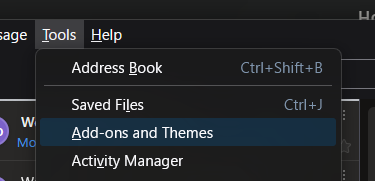
- Open Betterbird.
- Open Add-ons and Themes, then Extensions.
- Click the gear icon, then Install Add-on From File.
- Pick
polished-ui.xpifrom the tweaks folder and accept the prompt. - Restart Betterbird.
That's it. You should see sender initials, flat message rows, and a tidier reading pane.
Optional settings
Move the privacy notice to the bottom. The “blocked remote content” notice sits above the email by default. To move it down above the status bar:
- Open Settings, then General, then Config Editor at the bottom of the page.
- Search for
outlook.notice.bottom. If it isn't listed, choose Boolean and click the + button. - Set it to
truefor the bottom orfalsefor the top. It changes right away, with no restart.
Show text-only buttons. On an open email, click More, then Customize. Set Button style to Text.
Good to know
- The add-on asks for full access to Betterbird. It's part of FluentBird Polished, and it needs that access to add sender initials and a delete button to each row. Only install add-ons from people you trust.
- The delete button on each row really deletes. It's easy to hit by accident.
- Compose, Settings, and Calendar only get part of the new look.
- A big Betterbird update can break parts of the theme, because it relies on Betterbird's internal layout.
Changed your mind?
- In Add-ons and Themes, remove FluentBird Polished UI.
- Close Betterbird.
- In Betterbird's
profilefolder, delete thechromefolder anduser.js.
If you already had your own versions, the installer saved them there with before-theme in their names. Rename them back to chrome and user.js.
A few settings, like text size and the three-column layout, stay as they are until you change them in Betterbird's settings.
Links
- Betterbird and its downloads
- FluentBird Polished by Browmew
- FluentBird, the original theme
- Thunderbird, which Betterbird is built on
This is an unofficial fan project, not affiliated with Microsoft, Outlook, Betterbird, Thunderbird, or FluentBird.