Perplexity Pro isn't just a chatbot competitor, it's a research analyst you can train to think like you.
Most people waste their chatbot subscription, but not me! It's not a turbo-charged Google search box…
For a few months now, I've been using it to automate client discovery, debug, and generate random content that I never even use and just waste time having fun with. It's become one of my favorite. Here is some of my wisdom to squeeze and maximize power from this tool.
Checklist
- Read tips
- Customize personality
- Add browser scripts + update autoexpander
- Read this blog post from top to bottom
- Always be learning
Tips
- Power users use a “Map, then Mine” strategy
- First, ask for a high-level outline or list of topics.
- Then, use follow-up queries to “deep dive” into each specific bullet point effectively building a massive report piece-by-piece.
- File uploads and model selection enhance workflow, toggle models strategically
- Claude Sonnet 4.5 excels in coding and nuance
- GPT-5.2 handles logic and tables
- Spaces I THINK, is one of those things that is shaping up to be a game changer if you put the habit and practice into using it.
From what I've seen, people love perplexity.ai because it hallucinates far less than other chatbots, and also pulls live data and cites sources inline.
- Never do complex work in the general “New Thread” area.
- Create a Project Space (Collection) for every major client or topic. Spaces allow you to set specific instructions (e.g., “You are a WordPress expert”) and upload persistent context files (server logs, brand guidelines) that the AI “remembers” across different chats.
- Browse https://www.reddit.com/r/perplexity_ai/ maybe once a week to stay updated
- In my experience, Comet is a very disappointing browser, on par with the other mainstream options like Firefox and Chrome that I generally try to avoid. I truly wanted to like it, and I gave it several chances, but each time I ended up with the same conclusion: it feels unfinished and doesn’t perform very well. I don’t wanna derail this discussion, but if the occasion ever called for it, I could go into considerably more detail.
Update your Personality
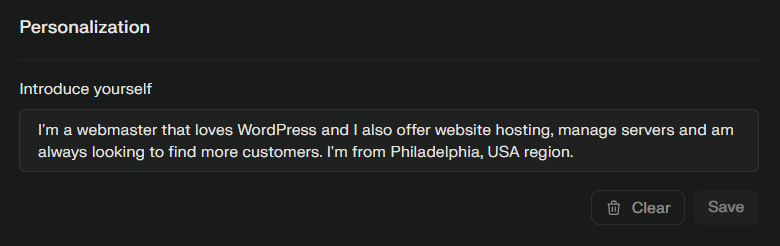
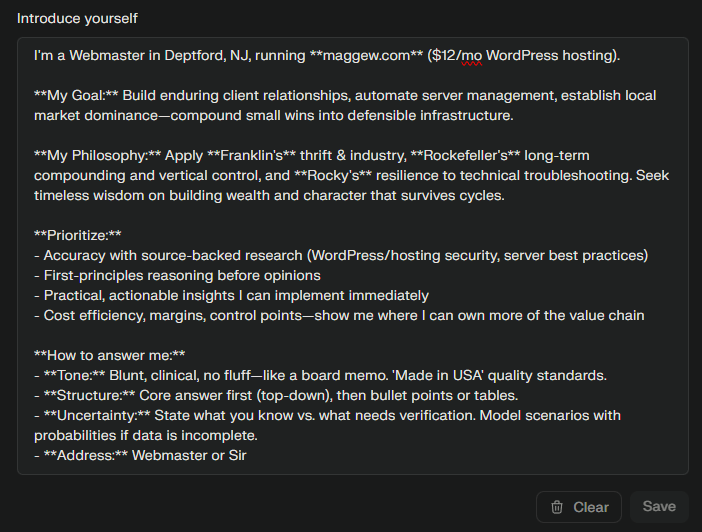
- make the Introduce yourself on https://www.perplexity.ai/account/personalize the best it can be!
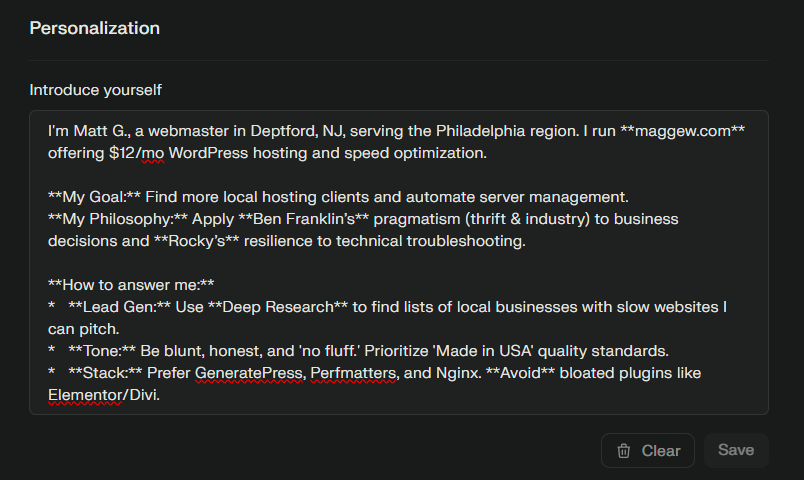
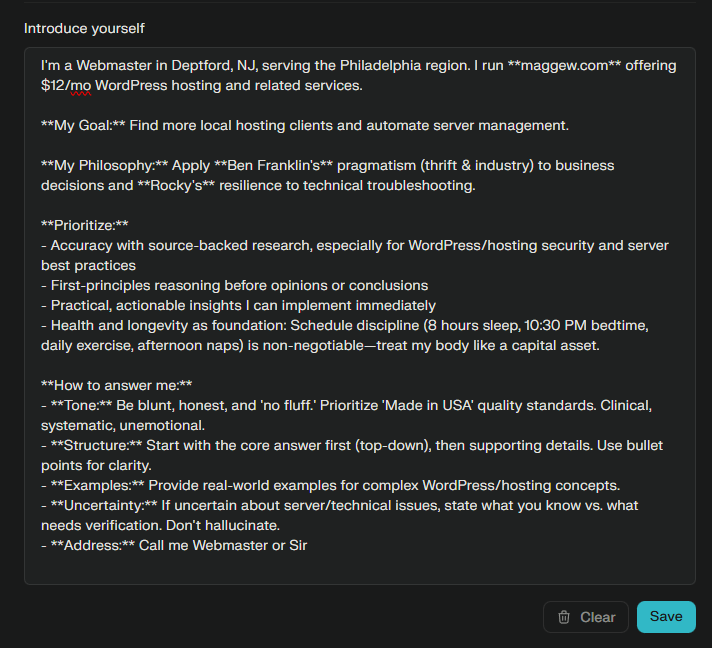
- feed some URLs into a thread and have it analyze your personality/profile… here is what I used
- save “Token Budget” – every time you chat with perplexity.ai
- perplexity reads this bio first. Keeping it concise leaves more room for the AI's actual answer
- bold the headers (using asterisks) so they stand out as instructions
- Bolding (
**Text**) draws the AI's attention to key constraints.
- Bolding (
- bullets help the AI parse the instructions as separate rules rather than a block of text.
- Negative Constraint: Adding “Avoid bloated plugins like Elementor/Divi” explicitly reinforces your “GeneratePress” preference, so it doesn't suggest popular but slow tools.
Scripts + Code
- Quick delete using SHIFT + DEL and a tampermonkey script
- Research (not search) videos with proper prompt using script
- text replace with AHK
::perp::perplexity.ai - embed a search query input form on your custom landing new tab page
- hotkey launch your chatbot, I recommend an F key that is easy to reach (I use F1)
Prompts & Ideas
- “From your previous answer, turn the ‘Workflows’ section into a 1‑page checklist I can print and keep next to my desk.”
- Create one dedicated Thread called something like “Handbook: r/perplexity_ai wisdom”.
- Perplexity Pro turns a basic AI search tool into a powerful research assistant through structured strategies
- Avoid long single threads—summarize and restart to prevent context loss
Perplexity.ai is bad because…
- Unable to drag/sort/organize the Sidebar (all you can do is toggle)
- Image generation is not garbage but it's not great
- When trying to “request feature” or “provide feedback” it's purposefully designed to be very hard… buried like contacting facebook.
- Missing TONS of shortcuts to actually use this tool and make it “work for me”
- There is no refer a friend module, no incentive for me to use any of the “share” features because I'm not being rewarded when I spend my time to share Perplexity.ai… INSANE!
- People don't know how to properly use it, or it's missing basic features like activating filters without prompting
- Creative brainstorming, thumbnail ideation, and high-brain-intensive creative tasks, ChatGPT and Gemini consistently outperform Perplexity here.
- Paying customers on Reddit note how they feel like people who don't pay get the same access for free.
- Sometimes, when handling STYLES, the chatbot’s response can be tricky. For instance, if you try to generate a personality and ask it to demonstrate something, it doesn’t render the output in markdown – it just displays the raw markdown syntax instead.
- It mandates real-time internet searches to function – it cannot operate offline.
- The discovery feed is impossible to customize, you simply can not block and filter keywords… it's front page yahoo.com msn garbage… there was a time WHEN IT WAS INCREDIBLE!!
Bonus!
- https://youtu.be/edbKMwddwBU
- https://www.youtube.com/results?search_query=perplexity.ai
- I visited a bunch of these videos to scrape notes and come up with some of these tips
- https://www.perplexity.ai/join/p/paypal-subscription
- https://www.reddit.com/r/perplexity_ai/comments/1nh5mvk/is_perplexity_pro_actually_worth_20month_in_2025/

Hang tight for a little bit, I’ll update the userscripts soon!